+EV Scanner
On this page we show the various filters available for the +EV scanner and how to read the results.
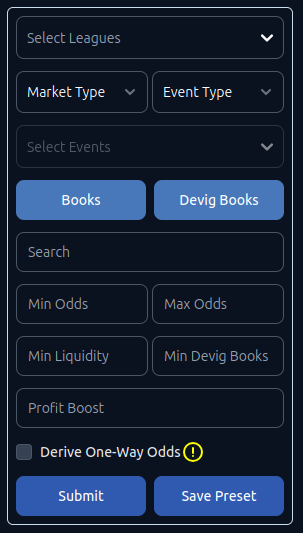
- Market Type: Regular Plays or Futures
- Event Type: Upcoming or Live
- Select Events: Only enabled when one league is selected in Select Leagues
- Books: Opens modal to select which books you want results for
- Devig Books: Opens modal to configure devig books and their weightings
- Search: Search for player, team, or market
- Min Odds and Max Odds: American odds range e.g. -200 and +200
- Min Liquidity: For exchanges - only use results that offer at least X liquidity
- Min Devig Books: Requre at least X devig books for a market to be displayed
- Profit Boost: Apply a boost to each result (e.g. 30 applies 30% boost)
- Derive One-Way Odds: Experimental. Read One-Way Derived EV before using.
- Save Preset: Saves configured filters for easier use in the future.
After submitting, the scanner will find plays based on your filters and display them.
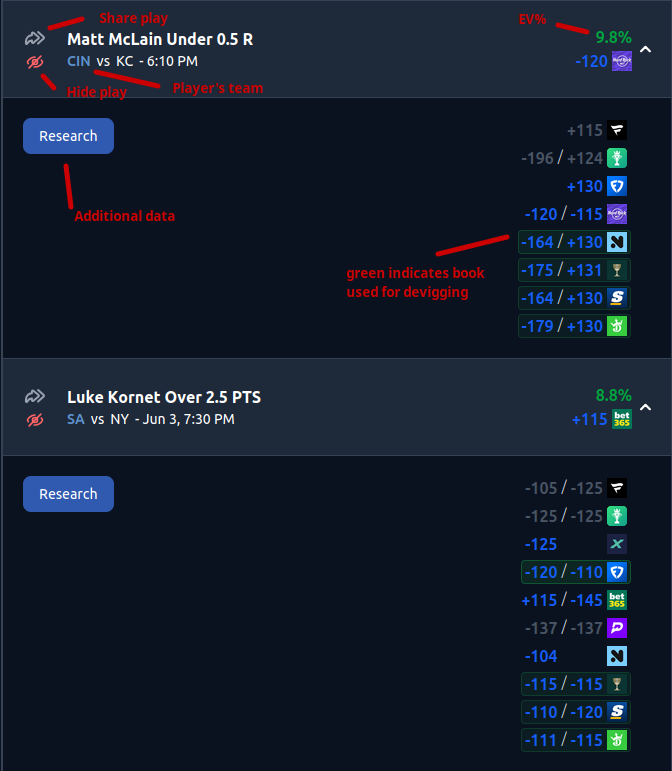
Depending on your filters, the strength of the +EV signals will vary. For example, the higher you set Min Devig Books, the stronger the signal. Understand that these are signals and not 100% conclusive. EVantage provides additional data to help understand when to trust signals.